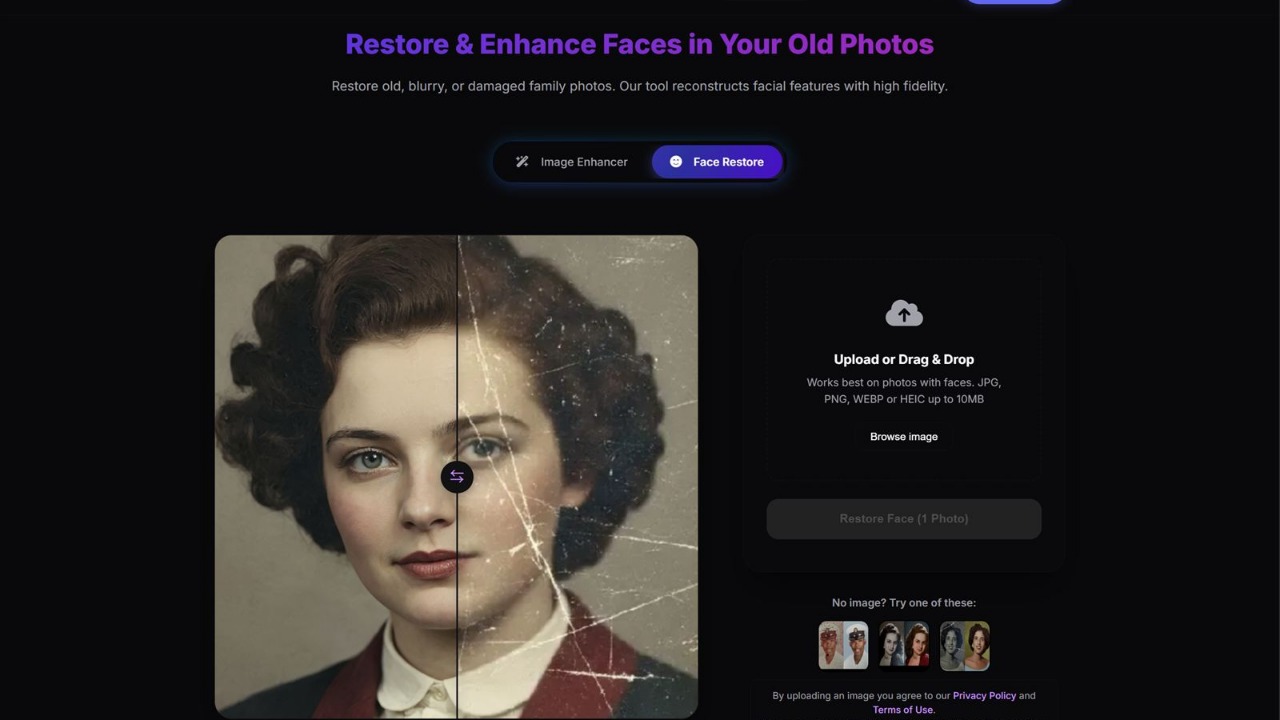
Restoring damaged family prints, rescuing soft product shots, and preparing crisp profile portraits no longer requires desktop layer masks. In 2026, browser-based AI photo restoration and enhancement tools handle scratch repair, deblurring, highlight recovery, 4x upscaling, and background blur in seconds.
Choosing the right tool still matters. Generic wrappers often smooth skin into plastic, invent unnatural details on old prints, or hide exports behind surprise watermarks. Reliable workflows require edge preservation, faithful tonal balance, and transparent pricing.
To highlight utilities built for real cleanup rather than novelty filters, the editorial team at AIWebsiteDirectory evaluated verified listings across our AI Image and Photography hubs using our 6-Factor Originality Rubric. Below are the 9 best AI photo restoration, unblur, and image enhancement tools in 2026.
Quick Verdict: Top Picks by Use Case
- Best All-in-One Portrait and Face-Swap Studio: Face AI (7.8/10 Originality, 8.2/10 Editorial), unifies photo enhancement, character design, and photo, video, and GIF face swaps.
- Best Dedicated Vintage Photo Restoration Tool: FixOldPic (7.8/10 Originality, 8.0/10 Editorial), repairs scratches, tears, fading, and blurry faces with watermark-free exports.
- Best Reference Photo Editor and Upscaler: ImageFX (7.8/10 Originality, 8.0/10 Editorial), pairs natural-language reference editing and upscaling with daily check-in credits.
- Best Simple Browser Unblur Utility: Sharpniq - Unblur Image (Verified), sharpens soft or out-of-focus photos online.
- Best Exposure and Highlight Rescue Tool: Fix Overexposed Photos (Verified), rebalances bright highlights and midtones with side-by-side comparison.
- Best Free 4x AI Upscaler and Batch Enhancer: Fast Image AI Image Enhancer (Verified), upscales multiple images up to 4x via drag-and-drop batching.
- Best Privacy-First Background Blur Tool: Blur Background (Verified), runs client-side in your browser with automatic subject detection and zero uploads.
- Best Real Estate Photo Enhancer: RealtyPhoto AI (Verified), batches up to 10 property photos and virtually stages empty rooms.
- Best Destination-Guided Profile Portrait Tool: ProfileLoom (Verified), turns one photo into tailored portraits for LinkedIn, resumes, and creator channels.
2026 AI Photo Restoration and Image Enhancement Comparison Matrix
| Rank | Tool Name | Primary Focus | Originality Score | Editorial Rating | Pricing Model |
|---|---|---|---|---|---|
| 1 | Face AI | Portrait enhancement, avatars, and face swaps | 7.8 / 10 | 8.2 / 10 | Freemium / Paid plans |
| 2 | FixOldPic | Vintage photo repair, de-scratching, and face recovery | 7.8 / 10 | 8.0 / 10 | Free credits + From $6 |
| 3 | ImageFX | Reference photo editing, upscaling, and video | 7.8 / 10 | 8.0 / 10 | Daily credits + Packs |
| 4 | Sharpniq - Unblur Image | Blur removal and photo sharpening | Verified | Pending Review | Free web tool / Freemium |
| 5 | Fix Overexposed Photos | Highlight and midtone exposure correction | Verified | Pending Review | Web-based tool |
| 6 | Fast Image AI Image Enhancer | 4x AI upscaling and batch enhancement | Verified | Pending Review | Free online tool |
| 7 | Blur Background | Client-side subject blur with no server upload | Verified | Pending Review | Free (No sign-up) |
| 8 | RealtyPhoto AI | Property photo enhancement and virtual staging | Verified | Pending Review | Web-based workflow |
| 9 | ProfileLoom | Platform-specific AI portraits and headshots | Verified | Pending Review | Freemium / Paid packs |
How We Evaluated AI Photo Restoration and Enhancement Platforms
Across our AI Image and Photography directories, we evaluated each tool on four criteria:
- Artifact Restraint: Models must recover edges and eyes without waxy smoothing or distortion.
- Workflow Focus: Single-task tools win on speed, while suites earn top marks only when each module performs.
- Privacy Boundaries: Archival prints, portraits, and client shots require local processing or private storage.
- Export Transparency: Rules on watermarks, batch caps, and credits must be clear upfront.
Scored tools follow our 6-Factor Originality Rubric, weighing core functionality, differentiation, niche focus, UX, technical depth, and positioning.
Detailed Reviews of the 9 Best AI Photo Tools
1. Face AI - Best All-in-One Portrait, Avatar and Face-Swap Studio
Originality Score: 7.8 / 10 (Distinctive) | Editorial Rating: 8.2 / 10 | Category: AI Image
Face AI earns the highest editorial rating by uniting portrait enhancement, character design, video generation, and multi-format face swapping inside one browser workspace. Creators manage retouching, avatar styling, and video swaps in a single editor rather than juggling separate apps.
Start with a photo, prompt, or brief, then refine outputs with its built-in enhancer or adjust role, outfit, pose, and mood settings. Dedicated face-swap workflows cover photos, GIFs, memes, and frame-by-frame video.
Key Strengths:
- Unifies photo enhancement, portrait creation, character design, and face swapping.
- Dedicated frame-by-frame video and GIF face-swap modes.
- Structured role, pose, and outfit controls for consistent characters.
Best For: Creators and marketers needing portrait refinement alongside avatar and face-swap tools.
Limitation to Note: Broad creative scope feels heavier than a single-purpose repair tool for one old scan.
2. FixOldPic - Best Dedicated AI Vintage Photo Restoration Tool
Originality Score: 7.8 / 10 (Distinctive) | Editorial Rating: 8.0 / 10 | Category: AI Image
FixOldPic focuses solely on restoring damaged, faded, and blurry vintage photographs in the browser. Instead of generic generative filters, it targets physical damage including scratches, tears, creases, stains, dust, color fading, and soft facial details.
Upload a scanned portrait or wedding photo, and its AI face enhancement and smart sharpening recover facial structure in minutes. New users receive free credits to test quality, paid plans start at $6 for one-time packs or subscriptions, and exports arrive watermark-free.
Key Strengths:
- Purpose-built pipeline for scratches, tears, creases, stains, and fading.
- Browser-based workflow with privacy-first handling and zero installs.
- Watermark-free exports and $6+ one-time packs or subscriptions.
Best For: Families, genealogists, and archivists restoring scanned historical prints.
Limitation to Note: Focused on print restoration rather than background blur or batch 4x upscaling.
3. ImageFX - Best for Reference Photo Editing and Upscaling
Originality Score: 7.8 / 10 (Distinctive) | Editorial Rating: 8.0 / 10 | Category: AI Image
ImageFX (operated at image-fx.app and independent of Google Labs ImageFX) pairs reference photo editing and AI upscaling with product showcase tools, text-to-image, and image-to-video in a three-step workspace. For marketers starting from an existing shot, it handles plain-language edits and upscaling cleanly.
Drag-and-drop uploads combine with commercial-ready downloads and generation history for revisiting earlier iterations. English, Korean, and Japanese UI support plus daily check-in credits simplify testing before buying credit packs.
Key Strengths:
- Combines reference editing, upscaling, product showcases, and image-to-video.
- Generation history tracking and commercial-ready downloads.
- Multilingual UI (English, Korean, Japanese) with daily check-in credits.
Best For: Ecommerce teams and marketers editing product shots and upscaling campaign assets.
Limitation to Note: Requires an account and credits, making anonymous one-off tweaks slower.
4. Sharpniq - Unblur Image - Best Lightweight Browser Tool for Unblurring Photos
Status: Verified Listing | Editorial Rating: Pending Review | Category: AI Image
Sharpniq - Unblur Image solves one common problem: rescuing soft, slightly out-of-focus, or camera-shaken photos without desktop software. Built as a streamlined web utility, it removes multi-panel clutter so you can sharpen portraits, product shots, and cropped screenshots fast.
Slight focus misses often ruin otherwise usable mobile shots and listings. Sharpniq keeps the workflow centered on edge definition and clarity as a quick pre-publish cleanup step.
Key Strengths:
- Dedicated AI sharpening workflow built around blur removal.
- Fast browser interface suited to everyday image cleanup.
- Minimal learning curve for non-technical users.
Best For: Bloggers, ecommerce sellers, and everyday users sharpening soft handheld photos.
Limitation to Note: Severe motion smear or missing focal data cannot be reconstructed with full accuracy.
5. Fix Overexposed Photos - Best for Highlight and Exposure Recovery
Status: Verified Listing | Editorial Rating: Pending Review | Category: Photography
Fix Overexposed Photos fixes overly bright images caused by harsh sunlight, flash, or misread auto-exposure. Instead of flattening contrast globally, it rebalances highlights, midtones, and exposure across JPG, PNG, and WebP uploads.
An interactive comparison view lets you inspect the correction against the original before saving. It also states physical limits clearly, noting that completely clipped pure-white highlights may lack recoverable detail.
Key Strengths:
- Targets highlight and midtone recovery instead of blunt brightness cuts.
- Supports JPG, PNG, and WebP with direct original-vs-corrected preview.
- Clear expectations on clipped highlights.
Best For: Photographers, travelers, and sellers rescuing washed-out outdoor or backlit photos.
Limitation to Note: Handles exposure only, requiring separate tools for scratch repair or upscaling.
6. Fast Image AI Image Enhancer - Best Free 4x AI Image Upscaler and Batch Enhancer
Status: Verified Listing | Editorial Rating: Pending Review | Category: AI Image
Fast Image AI Image Enhancer targets resolution and detail at scale. It improves clarity automatically and upscales low-resolution assets up to 4x without manual slider tuning or plugins.
Its main edge is batch processing inside a free drag-and-drop browser interface. Preparing storefront catalogs, blog graphics, or social thumbnails goes much faster when you enhance multiple files together.
Key Strengths:
- Upscales resolution up to 4x while sharpening fine edges.
- Batch processing handles multiple images simultaneously.
- Free drag-and-drop web workflow.
Best For: Ecommerce teams, bloggers, and designers upscaling batches of small graphics.
Limitation to Note: Built for upscaling and clarity rather than repairing tears or stains on vintage prints.
7. Blur Background - Best Privacy-First Client-Side Background Blur
Status: Verified Listing | Editorial Rating: Pending Review | Category: AI Image
Blur Background adds DSLR-style depth separation while protecting file privacy. Because processing runs entirely inside your browser with zero sign-up or server uploads, sensitive portraits and internal product shots remain on your device.
Automatic AI subject detection isolates the foreground subject and applies smooth background blur with adjustable intensity controls for subtle headshot bokeh or stronger room separation.
Key Strengths:
- Client-side browser processing with zero external server uploads.
- Automatic subject detection and adjustable blur strength.
- High-resolution exports without account sign-up.
Best For: Privacy-minded professionals softening distracting backgrounds in portraits or product shots.
Limitation to Note: Built for background bokeh rather than background replacement or relighting.
8. RealtyPhoto AI - Best for Real Estate Photo Enhancement and Virtual Staging
Status: Verified Listing | Editorial Rating: Pending Review | Category: Photography
RealtyPhoto AI specializes in residential and commercial property galleries. Agents shoot entire homes and need balanced interior and exterior lighting alongside furnished previews for vacant rooms.
It processes up to 10 photos per batch, combines enhancement with virtual staging, lets you inspect each edit against the original, and downloads files individually or as a ZIP archive.
Key Strengths:
- Combines interior and exterior enhancement with virtual room staging.
- Batch-processes up to 10 photos with side-by-side review and ZIP export.
- Built for MLS and rental listing workflows.
Best For: Real estate agents, property photographers, and rental hosts upgrading listing galleries.
Limitation to Note: Focused on property scenes rather than human portraits or vintage prints.
9. ProfileLoom - Best for Destination-Specific Profile Portraits and Headshots
Status: Verified Listing | Editorial Rating: Pending Review | Category: AI Image
ProfileLoom replaces prompt trial-and-error with destination-guided portrait enhancement. Upload one photo, pick a target platform such as LinkedIn, resumes, Instagram, YouTube, Discord, or Twitch, and let it adapt framing, lighting tone, and backdrop automatically.
Users can generate consistent multi-pose series using photographic or illustrated presets and finish cropping or enhancements inside its built-in editor.
Key Strengths:
- Platform-first workflow tailored to LinkedIn, resumes, and creator channels.
- Generates consistent multi-pose portrait packs from one upload.
- Built-in editor for cropping and refinement.
Best For: Job seekers, founders, and creators building cohesive profile photos across platforms.
Limitation to Note: Optimized for portraits and avatars rather than landscape cleanup or print repair.
How to Choose the Right AI Photo Tool for Your Workflow
Match the tool to the defect in your source image:
- Vintage Prints and Physical Damage: Start with FixOldPic to fix scratches, tears, and faded faces before resizing.
- Lighting, Focus, and Resolution: Recover highlights with Fix Overexposed Photos, sharpen edges in Sharpniq - Unblur Image, and upscale batches 4x in Fast Image AI Image Enhancer.
- Portraits, Avatars, and Privacy: Use Blur Background for zero-upload bokeh, ProfileLoom for platform-ready headshots, or Face AI for portrait and face-swap workflows.
- Product and Property Galleries: Choose ImageFX for reference edits and RealtyPhoto AI for batch property staging.
Building an AI photo restoration or photography tool? Submit Your AI Tool for our 8-point verification and 6-Factor Originality Rubric, or browse AI Image and Photography.
Frequently Asked Questions
What is the best free AI tool for restoring old damaged photos?
For damaged prints with scratches, tears, creases, and faded faces, FixOldPic is the strongest dedicated option because new users get free credits for watermark-free browser restoration before paying. For undamaged digital files needing sharpening or 4x upscaling, Sharpniq - Unblur Image and Fast Image AI Image Enhancer offer quick browser workflows.
Can AI photo enhancers fix severely blurry or overexposed photos?
AI enhancers recover useful clarity from moderate blur, soft focus, and bright midtones, though they cannot invent detail where sensor data was completely lost. Sharpniq - Unblur Image sharpens soft edges effectively, while Fix Overexposed Photos restores tonal balance with a side-by-side preview.
Which AI photo enhancement tools protect user privacy best?
When keeping photos off remote servers is critical, Blur Background processes images directly inside your browser with zero file uploads or sign-up required. For sensitive family archives, FixOldPic also uses private-by-design handling so restored prints are never shared publicly.
How can founders get their AI photo or image tool reviewed on AIWebsiteDirectory?
Founders building photo restoration, upscaling, or editing software can list their product via Submit Your AI Tool. Every submission goes through an 8-point verification check and evaluation under our 6-Factor Originality Rubric for placement in AI Image and Photography.
