
Vynix -Visual Website Feedback for AI Coding Agents
Rank #1AI-powered platform for building and deploying intelligent automation workflows.
About Vynix -Visual Website Feedback for AI Coding Agents
What is Vynix?
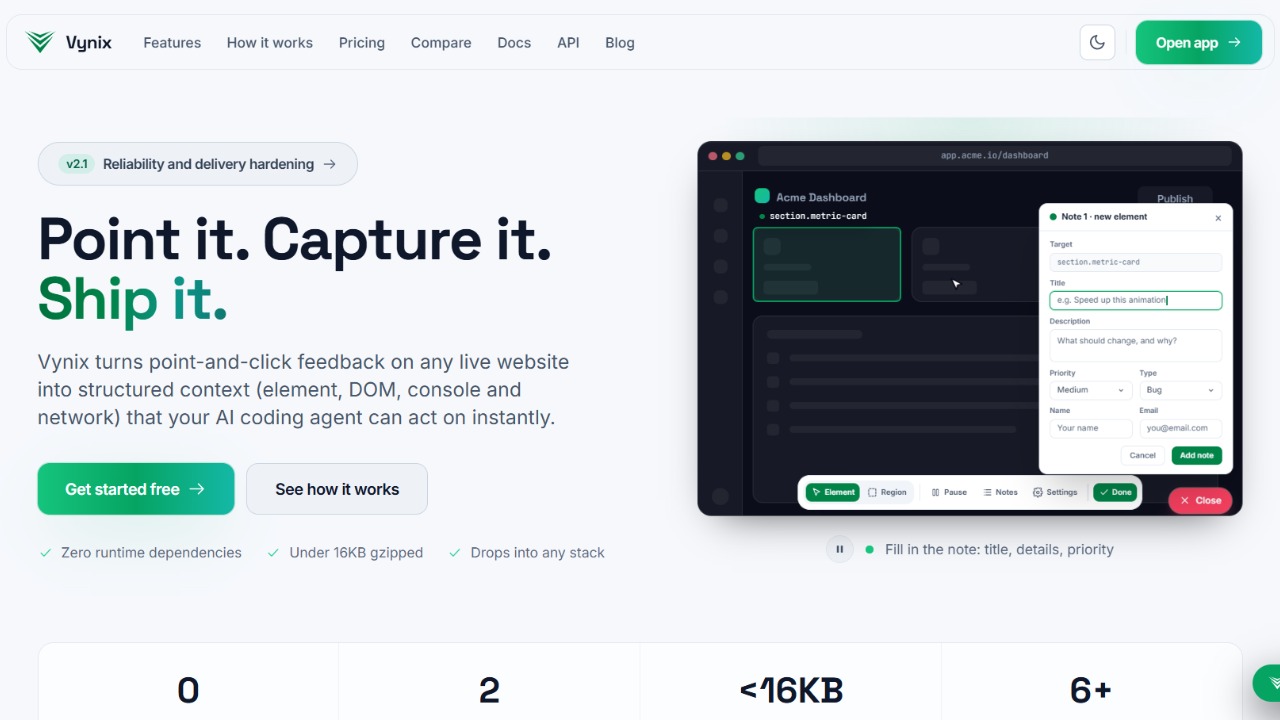
Vynix is an AI-native website annotation and developer-context platform. Drop a lightweight widget on any site, click on what is wrong, and Vynix captures the element, a screenshot, the page state, and a privacy-safe capture of console and network activity, then adds an AI diagnosis of the likely root cause. From there you copy a ready-to-build prompt or open a GitHub issue and assign it to a coding agent.
The result is feedback that already contains everything an engineer or an AI agent needs to ship the fix, with no follow-up questions.
The closed loop, from a click to a verified fix
Point - Use the widget or the browser extension to click the exact element that is wrong and leave a note.
Capture -Every note carries the selector, page URL, a screenshot, and the console and network context, automatically.
Diagnose - An AI root-cause diagnosis suggests the likely cause, a fix, and the files most likely involved.
Hand off - Turn the note into a clean prompt or a GitHub issue, then assign it to GitHub Copilot or your own agent.
Verify - Follow the issue from open to merged and confirm the fix closed the loop.
Built for AI coding agents
Vynix ships a native Model Context Protocol (MCP) server. Agents like Claude Code, Cursor, Windsurf, and GitHub Copilot read your feedback and its full captured context without leaving the IDE. MCP on its own is table stakes now, so the real differentiator is the end-to-end path from a pointed click to a verified fix.
Why teams choose Vynix
-Feedback that already contains the context an engineer needs to fix it.
-An AI diagnosis attached to every report, not a separate manual step.
-A direct path from a visual note to a GitHub issue and a coding agent.
-A widget that installs with one script tag and works on any framework.
Get started in a minute
Add one script tag to your site:
<script
src="https://cdn.vynix.in/widget.js"
data-project-key="pk_live_your_key"
></script>
Prefer no code? Install the Chrome extension and run Vynix on any site.
