Removing burned-in subtitles, photobombers, and messy backgrounds from video footage once required tedious rotoscoping or awkward crops. In 2026, generative video AI and temporal inpainting models turned cleanup into an instant browser workflow. Modern cleanup engines analyze motion vectors across contiguous frames, infer textures underneath occluded regions, and reconstruct clean pixels that preserve camera movement and lighting fidelity.
Whether erasing hardcoded captions from licensed clips, removing tourists from commercials, or isolating subjects without green screens, choosing the right tool is essential. The editorial team at AIWebsiteDirectory tested top platforms in our directory using our 6-Factor Originality Rubric.
Below are the 8 best AI video subtitle and object removers in 2026, ranked by temporal reconstruction quality, workflow ease, and verified performance.
Quick Verdict: Top Picks by Use Case
Here is our quick verdict by production use case:
- Best for Burned-in Subtitles: RemoveSubs (Originality: 8.4/10 | Editorial: 8.7/10), erases hardcoded captions without cropping original framing.
- Best for Object and Person Removal: ObjectRemover (Originality: 8.6/10 | Editorial: 8.8/10), prompt-guided inpainting that erases moving people and logos up to 1080p 60fps.
- Best for Background Cutouts: VideoCutout (Originality: 8.2/10 | Editorial: 8.6/10), neural rotoscoping that separates subjects and exports transparent WebM files.
- Best for 4K Detail Restoration: Video Upscaler (Originality: 8.1/10 | Editorial: 8.5/10), repairs compression artifacts and upscales footage to clean 4K.
- Best All-in-One Timeline Editor: ChatCut (Originality: 9.1/10 | Editorial: 9.3/10), prompt-driven editor that removes silences and auto-styles dynamic captions.
- Best for Thumbnail Text Removal: RemoveText (Originality: 7.9/10 | Editorial: 8.3/10), diffusion inpainting to erase watermarks from stills and cover art.
- Best Free Instant Cutout Tool: Peplio Background Remover (Originality: 7.7/10 | Editorial: 8.2/10), 100% free cutout tool for thumbnail creator composites.
- Best for Screencast Cleanup: Glideo (Originality: 8.9/10 | Editorial: 8.7/10), smooths jerky mouse paths and automates click zooms for 4K demos.
2026 AI Video Subtitle and Object Removers Comparison Matrix
| Rank | Tool Name | Primary Focus | Originality Score | Editorial Rating | Pricing Model |
|---|---|---|---|---|---|
| 1 | RemoveSubs | Burned-in subtitle and caption eraser | 8.4 / 10 | 8.7 / 10 | Freemium |
| 2 | ObjectRemover | Prompt-based video object and person removal | 8.6 / 10 | 8.8 / 10 | Pay-Per-Second |
| 3 | VideoCutout | AI background removal and transparent WebM export | 8.2 / 10 | 8.6 / 10 | Freemium |
| 4 | Video Upscaler | 4K upscaling, noise reduction, and artifact repair | 8.1 / 10 | 8.5 / 10 | Freemium |
| 5 | ChatCut | AI timeline editing, silence cutter, and auto-captioning | 9.1 / 10 | 9.3 / 10 | Freemium / SaaS |
| 6 | RemoveText | Context-aware text and watermark eraser for stills | 7.9 / 10 | 8.3 / 10 | Freemium Credits |
| 7 | Peplio Background Remover | Instant edge-preserving cutout tool for thumbnails | 7.7 / 10 | 8.2 / 10 | 100% Free |
| 8 | Glideo | Automated screencast cursor smoothing and click zoom | 8.9 / 10 | 8.7 / 10 | Freemium Early Access |
The Shift to Spatio-Temporal Video Inpainting
Legacy editors treated object removal as a clone stamp task. When subjects crossed a scene, drawing masks on individual frames caused noticeable shimmer across playback.
Platforms in our AI Video Category use spatio-temporal deep neural networks. Instead of isolating single frames, these models evaluate dozens of frames at once. The network tracks background motion, recognizes which textures exist behind an obstacle, and reconstructs covered pixels using clean visual data from adjacent frames.
This allows editors to erase hardcoded text, remove photobombers, or eliminate watermarks while keeping original camera motion and color gradients intact.
Detailed Reviews: The 8 Best AI Video Cleanup Tools
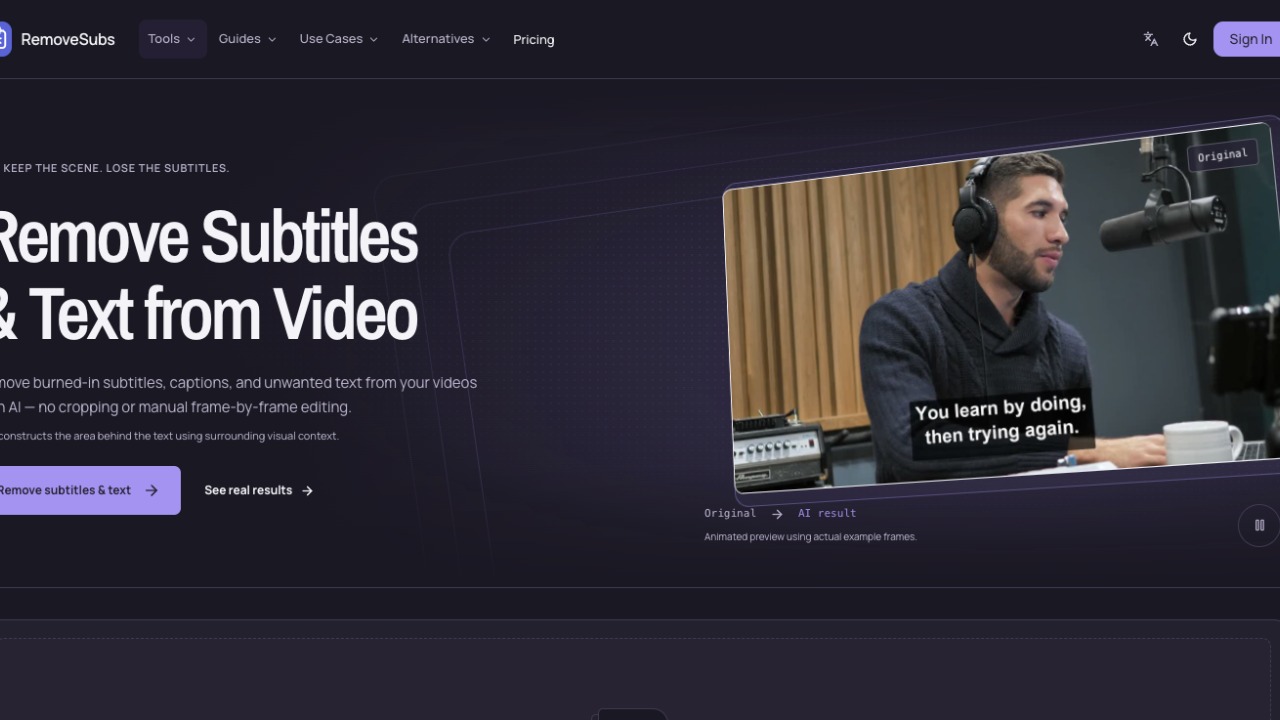
1. RemoveSubs: Best for Burned-in Subtitle Removal
Burned-in subtitles present a major obstacle when captions are permanently encoded into video pixels. Traditional software forces creators to place black letterbox bars or crop away the lower third.
RemoveSubs resolves this with temporal neural reconstruction. Tailored for hardcoded captions in MP4, MOV, and WebM videos, it avoids generic blurs. Instead, RemoveSubs tracks motion behind text blocks and pulls matching textures from neighboring frames to synthesize a seamless background.
- Zero Frame Cropping: Preserves your full aspect ratio without letterboxing.
- Temporal Consistency: Eliminates flickering by tracking background movement across time.
- In-Browser Previews: Inspect frame reconstruction before spending export credits.
- Broad Codec Compatibility: Handles standard MP4, MOV, and WebM files without prior conversion.
For documentary localization, archival footage cleanup, and caption re-styling, RemoveSubs is the benchmark subtitle eraser.
2. ObjectRemover: Best for Frame-by-Frame Video Inpainting
Erasing moving people, watermarks, or unwanted props requires tracking dynamic motion paths and shifting camera angles.
ObjectRemover combines optical flow tracking with deep temporal inpainting inside an intuitive web interface. Its defining strength is a prompt-guided workflow: upload your footage and provide a clear description such as "erase the tourist on the left" or "remove the corner watermark."
The neural engine builds an adaptive segmentation mask that follows the target across consecutive frames, removes target pixels, and fills the void with synthesized scenery.
- High-Resolution Support: Processes clips up to 1080p at 60fps with uploads up to 100MB.
- Adaptive Motion Tracking: Follows targets smoothly despite camera shake and perspective shifts.
- Pay-Per-Second Billing: Cost-effective pricing charged only for exact video seconds processed.
- Free Verification Credits: Trial credits allow creators to test inpainting quality prior to purchasing packs.
For travel creators and commercial editors, ObjectRemover delivers clean object removal without manual rotoscoping.
3. VideoCutout: Best for Green-Screen-Free Background Removal
Setting up a physical green screen and balancing studio lighting requires significant gear that mobile creators rarely have.
VideoCutout eliminates physical chroma keying with neural segmentation models trained on diverse human and product footage. It isolates foreground subjects from cluttered environments in a single automated step.
- Transparent WebM Export: Exports video with an alpha channel for immediate overlay in Premiere, DaVinci, or Final Cut.
- Instant Backdrop Swaps: Replace messy rooms with solid colors, office environments, or custom motion loops.
- Format Flexibility: Accepts MP4, MOV, WebM, and animated GIF formats.
For product creators and interviewers, VideoCutout produces clean edge separation around difficult silhouettes without green-screen spill.
4. Video Upscaler: Best for 4K Detail Restoration and Artifact Repair
Video cleanup frequently involves repairing pixel degradation caused by aggressive web compression, low sensor bitrates, and downsampling.
Video Upscaler uses deep generative models to restore low-resolution footage. Unlike standard bicubic stretching, it predicts and synthesizes missing high-frequency details to deliver crisp visual output.
- 4K Neural Upscaling: Enhances 720p and 1080p clips to 4K resolution while keeping text and facial edges defined.
- Noise and Grain Reduction: Cleans sensor noise from low-light scenes without creating waxy skin textures.
- Compression Artifact Repair: Eliminates macroblocking and pixel jitter from web-streamed clips.
- Parallel Batch Processing: Queue multiple source files to upscale batches simultaneously on cloud GPUs.
For creators restoring vintage footage or upgrading legacy recordings, Video Upscaler restores crisp visual fidelity.
5. ChatCut: Best All-in-One AI Timeline Editor and Silence Cutter
While standalone cleanup tools address individual pixel flaws, creators often need to refine pacing, cut silences, and generate stylized subtitles together.
ChatCut pairs timeline editing with conversational AI commands, earning an impressive 9.1/10 Originality Score and 9.3/10 Editorial Rating in our directory evaluation. Rather than manually slicing waveforms, you guide an intelligent editor through natural language.
- Automatic Silence Removal: Detects dead air and stuttered pauses, trimming clips while preserving natural cadence.
- Dynamic AI Captions: Generates animated, high-contrast captions styled for TikTok, Shorts, and Reels.
- Generative Timeline Media: Built-in video generation and image synthesis tools allow you to produce b-roll directly on the timeline.
- Auto-Framing: Re-frames horizontal 16:9 recordings into vertical 9:16 clips with subject tracking.
For podcasters and social video creators, ChatCut unifies audio cleanup, video trimming, and captioning into one workspace.
6. RemoveText: Best for Still Frame and Thumbnail Text Removal
High-performing videos require compelling thumbnails, yet keyframes captured from video footage often feature distracting watermarks, timestamps, or broadcast graphics.
RemoveText is a specialized AI text eraser built for static images, thumbnail stills, and promotional graphics. It pairs character detection with context-aware diffusion inpainting to erase words and reconstruct covered textures.
- Batch Frame Processing: Clean up to 10 captured video stills or product photos in one operation.
- Contextual Diffusion Inpainting: Rebuilds detailed surfaces like wood, brick, and skin without blurry patches.
- Prompt Instructions: Specify which text layers to remove when working with multi-element graphics.
- Free Trial Allowance: New users receive 30 free credits to test image cleanup.
Pairing video cleanup with thumbnail refinement via RemoveText guarantees your cover art matches your timeline polish.
7. Peplio Background Remover: Best Free Instant Cutout Utility
When you simply need to extract a creator cutout or product shot for a video thumbnail, paying for subscription plans is unnecessary.
Peplio Background Remover is a completely free, browser-based cutout tool requiring no user registration or software download. Simply upload an image to receive a clean, transparent PNG cutout within seconds.
- Completely Free Access: No sign-up barriers, subscriptions, or resolution limits.
- Precise Boundary Matting: Accurately handles flyaway hair, pet fur, and transparent objects.
- Batch Editing: Process multiple thumbnail cutouts at once to accelerate production.
- Full-Resolution Output: Preserves full camera dimensions without lossy downsampling.
For solo creators and thumbnail designers on a budget, Peplio provides zero-cost background isolation.
8. Glideo: Best for Screencast Cleanup and Cursor Smoothing
Software demos and product tutorials are essential for SaaS teams, yet raw screen recordings frequently suffer from erratic cursor movements and small UI elements.
Glideo fixes screencast chaos with a unique two-pass architecture that earned an 8.9/10 Originality Score and an 8.7/10 Editorial Rating in our directory review. Rather than recording flat pixels, Glideo captures interaction telemetry independently.
- Smooth Cursor Motion: Converts jerky mouse paths into cinematic curves that guide viewer attention.
- Automated Click Zooming: Automatically zooms into input fields and clicked buttons without manual keyframing.
- Post-Capture Adjustments: Adjust zoom depth and camera pacing after recording without re-capturing your screen.
- 4K Multi-Aspect Exports: Renders crisp demos in 16:9 for desktop sites and 9:16 for vertical social channels.
For founders and technical teams, Glideo turns rough screen captures into studio-grade product demos.
How We Evaluate Video Cleanup Tools: The 6-Factor Originality Rubric
At AIWebsiteDirectory, every platform featured in our guides is tested by editors using our 6-Factor Originality Rubric:
- Core Functionality (Weight: 25%): We verify whether tools perform reliably on complex footage with camera motion, shifting lighting, and detailed textures.
- Competitor Differentiation (Weight: 20%): We evaluate distinctive engineering choices, including spatio-temporal inpainting, prompt-based segmentation, and telemetry-based smoothing.
- Niche Specificity (Weight: 15%): Specialized tools that solve focused challenges exceptionally well, like RemoveSubs for burned-in captions, earn higher category rankings.
- Workflow and User Experience (Weight: 15%): We test real-time in-browser previews, export format options, and rendering reliability.
- Technical Depth (Weight: 15%): We analyze neural architectures, optical flow accuracy, edge matting quality, and temporal stabilization.
- Market Transparency (Weight: 10%): We evaluate clear pricing structures, trial availability, and explicit policies regarding user footage privacy.
Founders building innovative creative software can submit their product via the Submit Your AI Tool portal for editorial review.
The Complete 3-Step Creator Cleanup Workflow
To achieve professional visual results while preserving rendering credits, follow this recommended sequence:
- Step 1: Clean Up Artifacts, Subtitles, and Unwanted Objects
- Upload source footage to RemoveSubs to erase burned-in captions and lower thirds without cropping.
- If your clip contains photobombers, passing vehicles, or watermarks, use ObjectRemover to inpaint clean background scenery.
- Step 2: Enhance Resolution and Frame Quality
- Process compressed or low-light clips through Video Upscaler to upscale to 4K and reduce noise.
- For talking-head videos, upload your clip to VideoCutout to generate a transparent alpha channel for compositing.
- Step 3: Refine Narrative Pacing and Build Thumbnail Graphics
- Import footage into ChatCut to cut out awkward silences, trim filler words, and apply dynamic captions.
- Extract video cover frames and clean them using RemoveText and Peplio Background Remover to create polished social thumbnails.
Explore our full directory of creative utilities in the AI Video Category Index and the AI Image Directory.
Frequently Asked Questions
How does AI remove burned-in subtitles from video without cropping?
AI subtitle removers like RemoveSubs utilize spatio-temporal neural inpainting networks rather than simple blur filters. The model evaluates multiple consecutive frames to identify background textures present before or after the subtitle text appeared. It then reconstructs covered pixels using optical flow data and matching textures from adjacent frames. This technique allows videos to retain their original framing and camera motion without cropping the lower third of the frame.
Can AI remove moving people or complex objects from 4K video?
Yes, modern platforms like ObjectRemover can track and erase moving people, vehicles, and objects from high-resolution footage. The platform generates an adaptive segmentation mask that tracks the target across frames while compensating for lighting changes and camera motion. The AI then synthesizes believable background scenery. Results are cleanest when the background behind the target appears unobstructed in adjacent frames.
What is the best free tool to remove backgrounds from video clips?
For video background removal without green screens, VideoCutout provides free browser previews and supports transparent WebM alpha channel exports. If your primary need is isolating subjects or products for video thumbnail graphics and promotional cards, Peplio Background Remover is completely free, requires no user account, and preserves full image resolution without watermarks.
How can video creators submit their own AI video tools to AIWebsiteDirectory?
Developers and founders building innovative AI video editors, cleanup utilities, or creative media tools can submit their product directly through our Submit Your AI Tool portal. Submitted tools undergo our 8-point verification review, including functional testing and evaluation against our 6-Factor Originality Rubric. Verified tools receive a dedicated profile, editorial rating, and category placement.
